What you need to know about domain and certificate migration
Domain migration: Validated OV and EV domains
Organization-validated (OV) domains and Extended Validation (EV) domains are migrated when you activate your CertCentral account.
Domains pending validation
Domains with pending validation are not migrated. However, once pending domain validation has been completed, validated domains are brought over when you import active public TLS/SSL certificates.
Domain validation (DV) domains do not migrate. DV certificates require you to complete domain control validation for every DV certificate event, like new issuance, replacement, and renewal. To migrate a DV domain, simply request, replace, or renew a DV certificate for the domain from your CertCentral account.
Certificate migration: Public TLS/SSL certificates
Certificates are not automatically migrated to your new CertCentral account. You'll import your certificates after you activate and sign into your new account. All valid TLS/SSL and code signing certificates can be imported.
Pending certificates cannot be imported. However, if a certificate request is approved and issued in your legacy account, go to CertCentral to import it.
Expired, revoked, and deactivated certificates cannot be imported.
To import your valid certificates, go to Certificates > Orders in CertCentral. Click Import legacy certificates.
Important
Currently, only the person who activates the CertCentral account can access the Import legacy certificates option on the Orders page. Other users in your account can access the Orders page and interact with the imported certificates, but they never see the Import legacy certificates button.
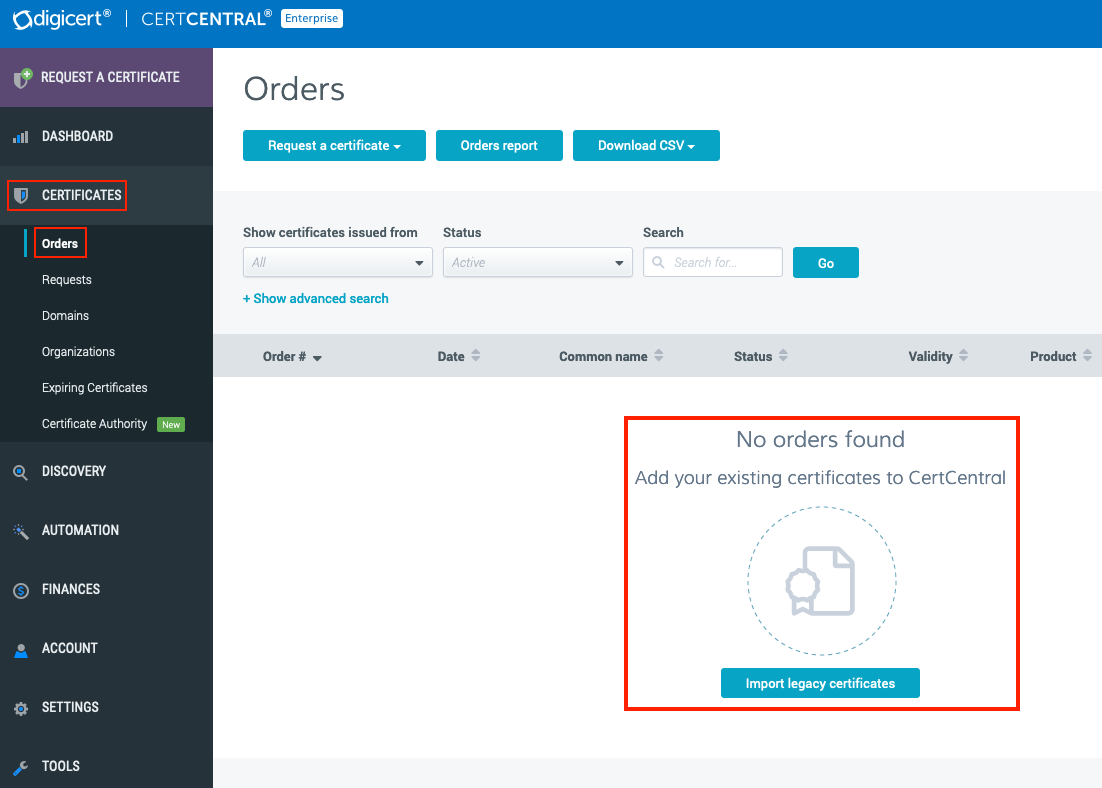
Currently, certificates can be imported once every 24 hours. With each additional import, only new certificates are brought over to CertCentral.
When you import your active, public SSL/TLS certificates to CertCentral, we copy the email addresses from the order in your old account and add them to the additional emails section of your migrated orders.
Retail: The organization and technical contacts email addresses are copied over to the migrated orders.
Enterprise: The technical contact email address is copied over to the migrated orders.
CertCentral: Certificate orders' additional emails feature
In CertCentral, certificate orders include an additional emails feature. This feature allows you to assign additional email addresses to receive notification emails for the certificate order: renewal notices, reissues, duplicates, etc. To view details about an order, in the left main menu, go to Certificates > Orders. On the Orders page, click the certificate's order number.
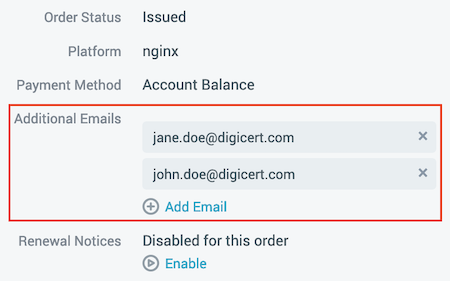
When orders are migrated to CertCentral, renewal emails for these orders are disabled by default. This is because renewal notices for migrated orders are still sent from your old account. See Renewal emails.
After the order is renewed from your CertCentral account, renewal notices are automatically enabled, then sent from CertCentral.
Other types of certificate migration: What about private TLS and other non-TLS certificates?
Some Private TLS/SSL, S/MIME, and other types of certificates cannot be migrated at this time. Talk to your account manager or contact us to help move your other valid certificates to your new CertCentral account.
Renewal emails
Your public SSL/TLS certificate renewal emails will continue to come from your old account. The renewal content will change to meet your current situation.
Non-migrated accounts: Public SSL/TLS certificate renewal email content will remain unchanged and continue to point to your legacy account for renewals.
Migrated accounts: After you activate your CertCentral account and import your active public SSL/TLS certificates, the public SSL/TLS certificate renewal email content will change and point to your CertCentral account for renewals.
What about private TLS and non-TLS certificate renewals?
Even after an account is migrated, private SSL/TLS and non-SSL/TLS certificate renewal emails will remain unchanged and link to your legacy account for renewals.
Will my imported certificates have the same product names as before?
When public SSL/TLS, code signing, and private SSL/TLS certificates are imported to your CertCentral account, they will appear on the Orders page with their new DigiCert CertCentral product names.
Legacy public SSL/TLS product to CertCentral SSL/TLS product mapping
Legacy certificate product name | CertCentral product name |
|---|---|
Secure Site Pro with EV Premium Extended Validation SSL | Secure Site Pro EV SSL |
Secure Site Pro Secure Site Pro Wildcard Premium SSL | Secure Site Pro SSL |
Secure Site with EV Standard EV SSL | Secure Site EV |
Secure Site Secure Site Wildcard OFX SSL Standard SSL Wildcard SSL | Secure Site OV |
True BusinessID with EV | GeoTrust TrueBusiness ID EV |
RapidSSL Enterprise Premium Intranet SSL Standard Intranet SSL True BusinessID True BusinessID Wildcard | GeoTrust TrueBusiness ID OV |
GeoTrust Trial QuickSSL QuickSSL Premium QuickSSL Premium Wildcard | GeoTrust DV SSL |
SSL Web Server with EV | Thawte SSL Webserver EV |
SSL Web Server SSL Web Server Wildcard | Thawte SSL Webserver OV |
SSL123 SSL 123 Wildcard | Thawte SSL123 DV |
FreeSSL | RapidSSL Standard DV |
RapidSSL | Retail: GeoTrust Standard DV Partner: RapidSSL Standard DV |
RapidSSL Wildcard | Retail: GeoTrust Wildcard DV Partner: RapidSSL Wildcard DV |
Legacy code signing product to CertCentral code signing product mapping
Legacy certificate product name | CertCentral product name |
|---|---|
Symantec EV Code Signing | EV Code Signing |
Symantec Java Code Signing Symantec Authenticode Code Signing Symantec MS Office & VBA Code Signing Symantec Adobe Air Symantec Brew | Code Signing |
Thawte MS Office & VBA Code Signing Thawte Mac Thawte Adobe Air | Code Signing |
Legacy private SSL/TLS product to CertCentral private SSL/TLS product mapping
Legacy certificate product name | CertCentral product name |
|---|---|
Symantec General Private SSL Symantec Dedicated Private SSL | Private SSL OV |