Integrate with Management REST APIs
DigiCert® ONE Device Trust Manager APIs fall into two categories:
Management REST APIs
Certificate Issuance APIs
Management REST APIs:
Use the Management REST APIs to integrate your connected product solution with Device Trust Manager. The Management REST APIs support CRUD operations for core objects, including:
Certificate Issuance APIs:
Certificate Issuance APIs are standards-based APIs for issuing and renewing X.509 certificates. Supported industry-standard protocols include:
Note
This document covers Management REST APIs. For certificate enrollment and renewal workflows, see Integrate with Certificate Issuance APIs.
Before you begin
Review the different Authentication methods supported by Device Trust Manager APIs.
Understand the Management REST APIs
API helpers:
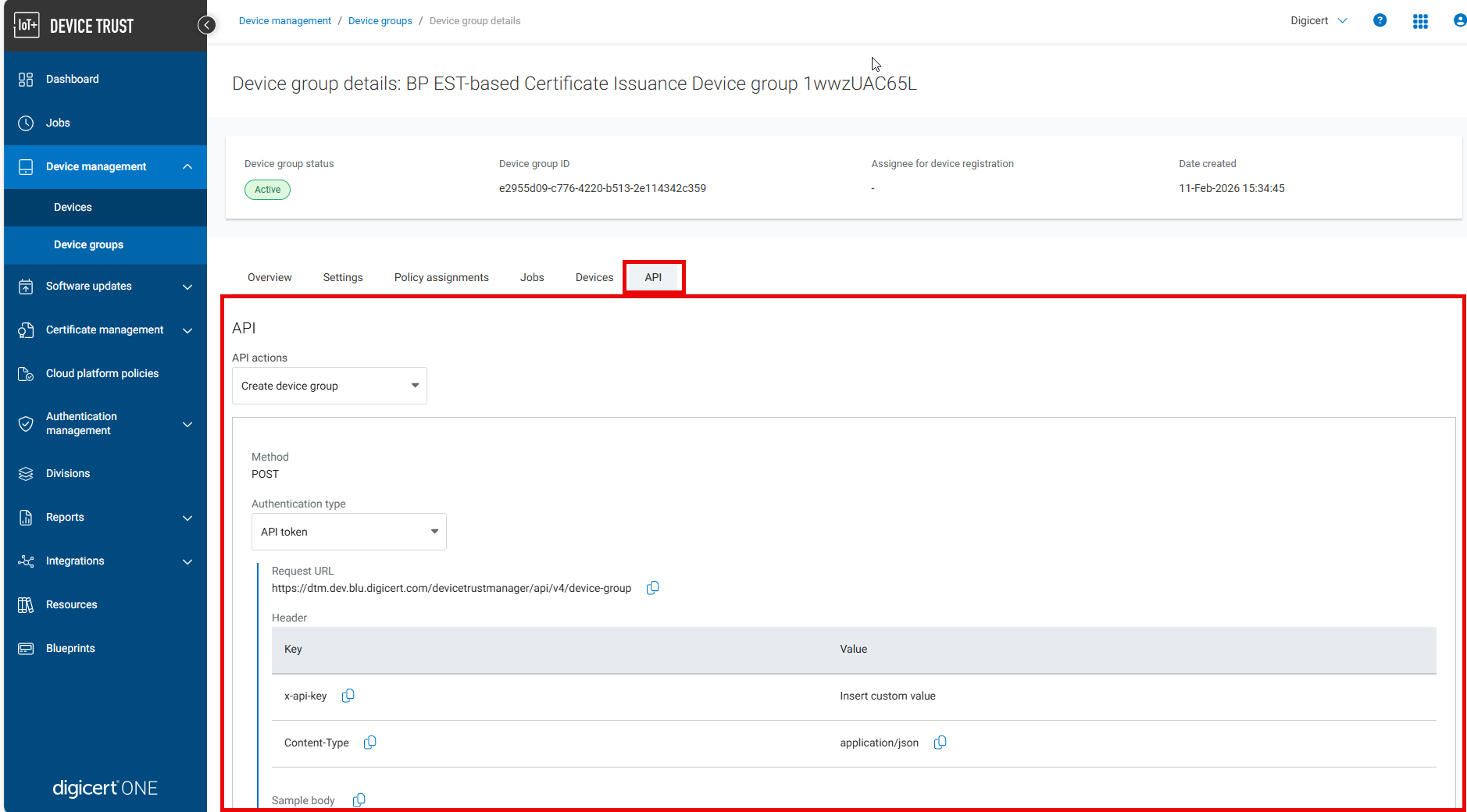
The fastest way to understand the available operations is through the API helpers in the Device Trust Manager portal. On each page in the UI, the API actions section shows the corresponding API calls for that resource. This provides endpoint paths, supported methods, and example request payloads.
Swagger:
Alternatively, you can review the Swagger (OpenAPI) specification to see the available endpoints, request and response schemas, and required and optional parameters. Use Swagger when you need a full reference of supported operations.
Authentication:
The Management REST APIs supports API key authentication (header-based) and Mutual TLS authentication (client authentication certificate).
Select the method that aligns with your security requirements and deployment model.
API Key Authentication
To authenticate with an API key, include the custom HTTP header, x-api-key, in your request. Provide your own API key as the value for this header when you submit your request.
Example for creating a new device:
curl -X POST \
  'https://one.digicert.com/devicetrustmanager/api/v3/device' \
  -H 'x-api-key: {{api_key}}' \
  -H 'Content-Type: application/json' \
  -d '{
    "name": "device123",
    "deviceGroupId": "b5a8a9a0-de22-4890-9d37-b7f778f22cac",
    ...
  }'
Create an API Key
To create a new API key:
Sign in to DigiCert ONE.
In the Managers () menu, select Account.
Select Access > Service User > Create service user.
Complete the form and select Device Trust from the DigiCert ONE Manager access dropdown menu.
Select Next.
On the Roles and permissions page, select Solution administrator from the dropdown menu.
Select Add user.
Copy the generated API key and store it securely.
Important
An API key is displayed only once.
Lost keys can’t be recovered. Revoke and regenerate instead.
Don’t associate API keys with individual user accounts.
If a user account is deleted, its API key is deleted as well, breaking production integrations. Always navigate to Access > Service User to find the user account for API access.
Create an API authentication certificate
The Management REST API supports mutual TLS (mTLS). With mTLS, a client can access the endpoint by presenting a trusted certificate in the request.
Sign in to DigiCert ONE.
In the Managers () menu, select Account.
Select Access > Service User to find the user account.
Select the user account to edit.
Navigate to the Client authentication certificates section.
Under the Client authentication certificates section, either Create or Upload a Client authentication certificate.
Use mutual TLS in API requests
To use mutual TLS authentication:
Include the client authentication certificate in the request. Use the clientauth prefix in the base URL. For example:
https://clientauth.one.digicert.com
Do not include the x-api-key header.
Base URL
Use the following base URL for Management API requests:
https://one.digicert.com
URL query strings
Some endpoints support filtering via query parameters:
Use
?to append the first query stringUse
&to append additional parameters
Example for creating a new device:
https://one.digicert.com/devicetrustmanager/api/v3/device/{{device_identifier}}?division_id={{division_id}}Requests
Management API requests:
Use RESTful URLs
Supports header-based authentication
Accepts JSON payloads
Use UTF-8 character encoding
Are sent over port 443
A well-formed request includes appropriate HTTP headers such as:
Content-Type
HTTP methods
The DigiCert® ONE APIs use standard HTTP methods, including:
GET: Retrieve resources
POST: Create resources
PUT: Update resources
DELETE: Remove resources
Request body
Unless otherwise noted, requests require a payload in:
application/json
Set the Content-Type header accordingly.
Responses
Responses include:
HTTP headers
A response body
The response format depends on the Content-Type specified in the request.