Microsoft Intune SCEP integration guide
Integration architecture
The following illustration explains how Microsoft Endpoint Manager integrates with DigiCert® Trust Lifecycle Manager via SCEP.
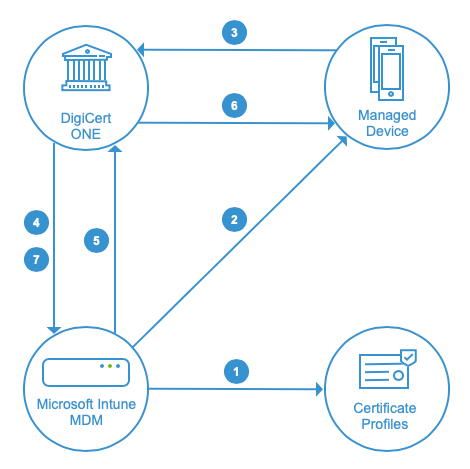
The Intune Administrator creates certificate templates in Microsoft Intune corresponding to the certificate profiles created in DigiCert® Trust Lifecycle Manager.
Microsoft Intune deploys the Device Configuration profiles (Trusted Certificate & SCEP types) to the specified group of endpoint devices.
One of the devices requests a certificate from Trust Lifecycle Manager.
DigiCert validates the request with Intune.
Microsoft Intune provides the validation response to the DigiCert SCEP service.
DigiCert issues the certificate to the requesting device.
Finally, DigiCert provides the confirmation message to Intune.
Workflow
To set up the Microsoft Intune integration via SCEP, complete these tasks in order:
Task | Documentation | |
|---|---|---|
1. | Configure Intune settings, and make sure the required base templates and seats are available in Trust Lifecycle Manager. | |
2. | Set up the Microsoft Intune connector in Trust Lifecycle Manager. | |
3. | Create the trusted certificate profile in Intune, and create the corresponding certificate profiles in Trust Lifecycle Manager for enrolling certificates. | Intune device profile and DigiCert certificate profile configurations for certificate use cases |
4. | Enroll devices in the Intune mobile device management (MDM) platform. | |
5. | Verify the issued certificates in Trust Lifecycle Manager. | Verify certificate issuance details in Trust Lifecycle Manager |