Reissue certificates
Reissue a certificate to update certificate details, replace the key pair, or use remaining coverage on an annual plan or Multi-year Plan. Reissuing creates a new version of the certificate on the same order.
Annual plans
As of February 24, 2026, DigiCert TLS/SSL certificate plans are one year by default. Learn more about DigiCert annual plans.
Before you begin
A new CSR must be generated before reissuing. Generating a new CSR creates a new unique key pair for the reissued certificate. See Generate a certificate signing request (CSR).
Domain and organization validation must be current for the reissued certificate to proceed without delay.
For annual plans and Multi-year Plans: reissuing is the primary mechanism for using remaining coverage on the plan when the active certificate approaches expiration.
Changing or removing SANs triggers automatic revocation of the original certificate and all duplicates and reissues within 72 hours. Ensure replacements are ready before submitting.
How does the revocation process work?
Reissuing a certificate that changes or removes SANs automatically triggers revocation. DigiCert revokes the original certificate and all existing duplicates and reissues within 72 hours of the new certificate being issued. Replace affected certificates before the deadline.
DigiCert does the following:
Send the requestor a revocation warning email with the subject line: Reissue request will revoke previously issued certificate for order ###### within 72 hours.
Change the Certificate status to Revocation pending with the revocation date and time on the Certificate history page.
Reissue a certificate
In the CertCentral main menu,
For Enterprise, Partner, and Legacy accounts: go to Certificates > Orders.
For Subscription accounts: go to My Digital Trust Products > Certificates.
Select the certificate to reissue.
From the Certificate actions menu, select Reissue certificate.
Depending on your changes, the original certificate and previous versions (reissues and duplicates) may need to be revoked. A warning message appears. Confirm to proceed.
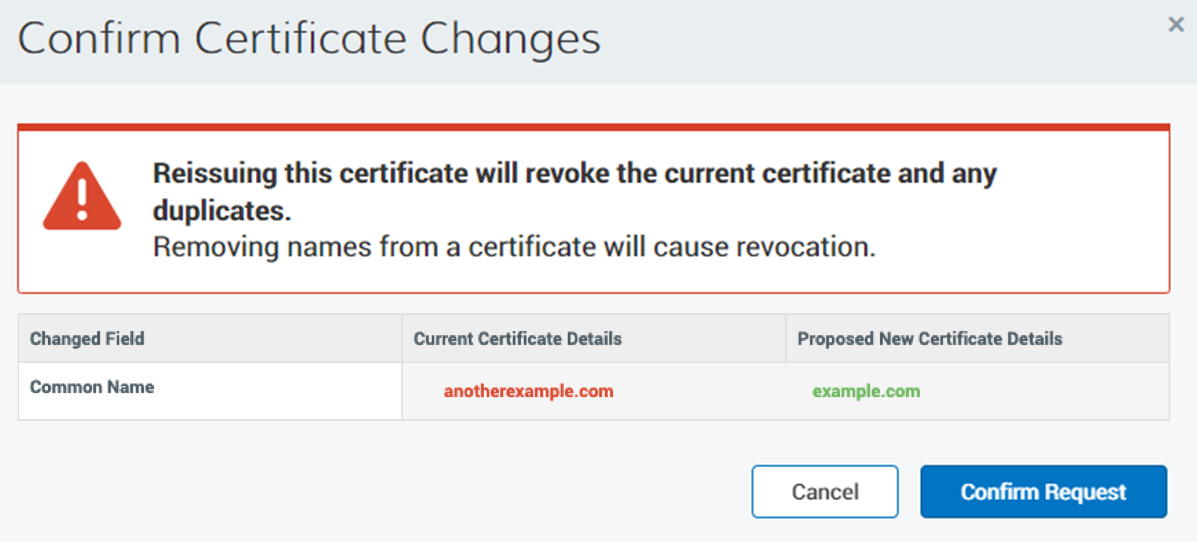

Update the common name or SANs if required.
Generate or upload a new CSR.
To change the extended key usage (EKU) options for the reissued certificate, expand Additional certificate options and under Extended key usage (EKU), select the EKU option:
Server Authentication: DigiCert includes only the Server Authentication EKU. This is the default.
Server Authentication and Client Authentication: DigiCert includes both EKUs. Select this option for mutual TLS (mTLS) use cases that require Client Authentication.
Important
On March 1, 2027, DigiCert will remove EKU options from CertCentral request forms. After this date, DigiCert issues public TLS certificates with the Server Authentication EKU only. For background, see Sunsetting Client Authentication EKU from DigiCert public TLS certificates.
Confirm the certificate validity period.
Select the payment method if applicable.
Notice
On some pending certificate orders, CertCentral displays the Certificate Services Agreement before submission. If this appears, read and accept it to proceed.
Select Submit.
After submission, the reissued certificate remains pending until all required validations are complete.
DigiCert issues the reissued certificate and emails it to the certificate contact. See Download a TLS/SSL certificate from your CertCentral account.
Pending certificate revocations
If certificate revocations are required, replace soon-to-be revoked certificates within 72 hours from when your certificate is reissued.
Install and configure the reissued certificate on your server. Reissuing does not automatically update the certificate on your website. See SSL Certificate Installation Instructions & Tutorials page.
Reissue FAQ
Question: Do I need to create a new CSR when I reissue my SSL/TLS certificate?
Answer: Yes. Best practices are to generate a new certificate signing request (CSR) when reissuing your SSL/TLS certificate. Generating a new CSR creates a new, unique key pair (public/private) for the reissued certificate. For more information, see Create a CSR.
If you have a Windows server, you can use the free DigiCert Certificate Utility for Windows , which has an easy CSR generator for Windows servers.
What's next
Duplicate certificates to request a duplicate certificate with the same or rearranged domains without revoking the original