Data analyst
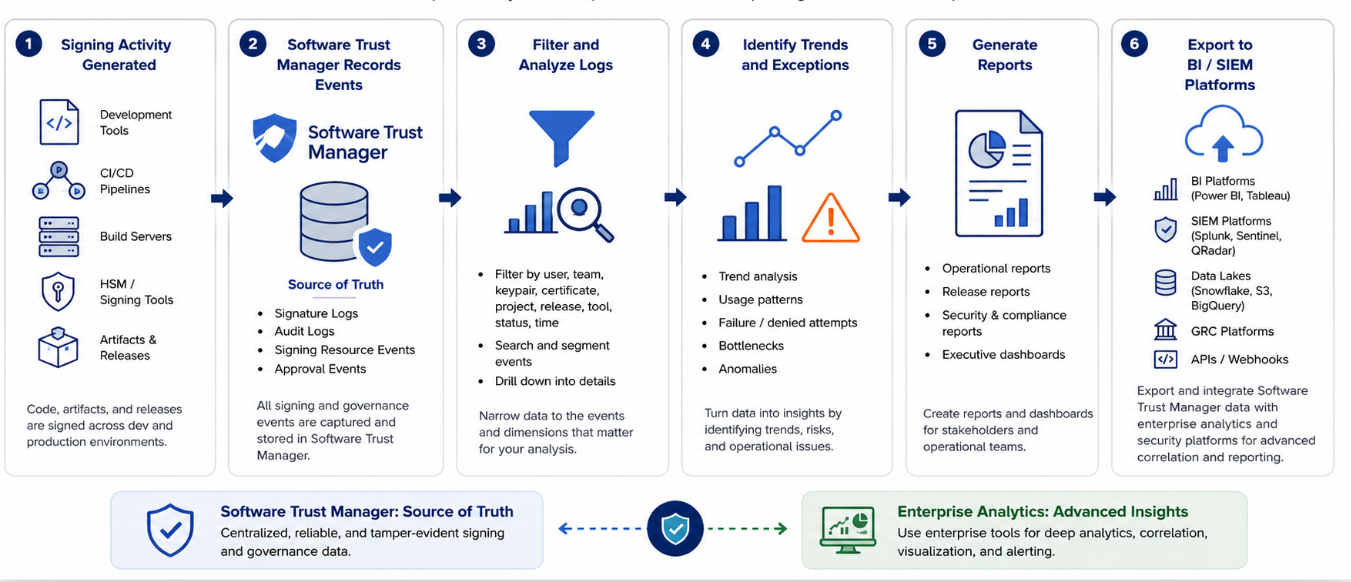
The data analyst monitors and analyses software-signing activity across development and production environments.
Using Software Trust Manager, data analyst can:
Monitor software-signing activity
Analyse signing trends and operational performance
Investigate failed and denied signing events
Track keypair and certificate usage
Measure release signing activity
Support compliance and audit reporting
Export signing data for external analytics platforms
Export audit logs for audit activity and governance
Generate reports to provide actionable insights and support decision-making
注記
This role is not predefined. Create a custom user role by assigning the required permissions as needed.
The Data Analyst role contains the following permissions:
Category | Permission | Description | Notes |
|---|---|---|---|
User settings | Default | View their own user profile and generate their own API key and client authentication certificate in DigiCert ONE. | |
Account settings | View health | View app health (API). | |
Audit logs |
|
| ‘ |
Certificates | View certificate | View certificate details in the account. | |
Keypairs | View keypair | View keypair details in the account. | |
Releases | View release | View releases in the account. |
Ensure that:
You have been assigned the appropriate read-only permissions
Your account has access to signature logs and audit logs
Signing activity exists within Software Trust Manager for analysis
Your organization has defined reporting requirements and KPIs
To review software-signing activity across teams, releases, and environments:
Sign in to Software Trust Manager.
Navigate to Logs > Signature Logs.
(Optional) To isolate specific signing events for operational analysis, apply these filters:
User
Team
Keypair
Project
Certificate
Release
Signing Tool
Event Type
Data Range
Review signing activity details, including signer, artifact, timestamp, certificate, keypair, signing tool, and signing status.
Signature logs help you see how signing resources are used across organization. You might observe patterns such as frequently used or under-used signing assets, as well as shared signing resources . Filte the logs by:
Keypair
Certificate
Project
Release
Patterns in failed or denied events might indicate operational bottlenecks or activity that requires operational or security review.
To identify operational bottlenecks and signing issues:
Open Audit Logs and Signature Logs.
Filter for:
Failed events
Denied events
Authorization failures
Resource access issues
Review:
User
Timestamp
Event details
Affected resource
To measure signing activity across software releases:
Filter by Project or Release.
Review:
Number of signing events
Signing success rate
Signing-resource usage
Release timing
By analysing release activities, you can provide release-specific reporting and operational insights.
Use Audit Logs to analyse security and governance events related to signing controls.
Navigate to Audit Logs.
Review events related to:
Keypair creation
Keypair deletion
Keypair export requests
Certificate revocation
Approval workflows
Filter audit activity by user, event type, or date range to gain visibility into signing governance activity and control effectiveness.
Export Software Trust Manager signing and audit data when your organization needs to include signing operations in broader enterprise reporting platforms.
To retrieve STM logs you must use the following method:
Audit logs
curl command example to get audit logs in a particular time window:
curl -X GET "https://one.digicert.com/signingmanager/api/v1/audit-log?account_id=1bba1de1-32e1-46be-9bb9-f82dea6e9081&limit=10&offset=0&start_timestamp=01-Jun-2026%2000%3A00%3A00&end_timestamp=16-Jun-2026%2023%3A59%3A59" -H "accept: application/json" -H "x-api-key: 01******5"
Signature logs
curl command example to get signature logs in a particular time window:
curl -X "GET" "https://one.digicert.com/signingmanager/api/v2/signatures?start_timestamp=01-Jun-2026%2000%3A00%3A00&end_timestamp=16-Jun-2026%2023%3A59%3A59" -H "accept: application/json" -H "x-api-key: 01******45"
External platforms (example | Common analysis uses |
|---|---|
| Security investigations, operational dashboards, and long-term trend analysis. |
| Executive reporting, compliance reporting, and analytics across signing activity. |
| Governance and audit reporting supported by exported signing data. |