DevOps engineer
The DevOps engineer builds, tests, deploys, and operates governed software-signing workflows across CI/CD, scripted build systems, and centralized signing environments. Users in this workflow integrate Software Trust Manager with signing tools while keeping private keys protected and signing activity traceable.
Using Software Trust Manager, DevOps engineer can:
Create reusable signing stages for CI/CD and scripted build workflows.
Configure CI/CD marketplace plug-ins and scripts for signing automation.
Standardize signing tool integrations such as SMCTL, KSP, PKCS#11, JCE, APIs, and native signing tools.
Bind workflows to approved teams, projects, releases, keypairs, and certificates.
Include scan-before-sign or signing approver checks where policy requires them.
Verify signed artifacts and review audit and signature logs for release evidence.
Coordinate HSM-backed resilience, migration, and scaling decisions through validated architecture rather than direct pipeline-to-HSM coupling.
注記
This role is not predefined. Create a custom user role by assigning the required permissions as needed.
The DevOps engineer role typically needs the following Software Trust Manager permissions:
Category | Permission | Description | Notes |
|---|---|---|---|
User settings | Default | View own user profile and generate own API key and client authentication certificate in DigiCert ONE. | |
Audit logs | View audit log | View audit and signature logs to verify signer, keypair, certificate, artifact, and workflow evidence. | |
Certificates | View certificate profile; view certificate template; view certificate | View certificate profiles, certificate template details, and certificate details for assigned certificates. | |
Keypairs | View keypair | View assigned keypairs and key rotations that rely on assigned keypairs. | |
Signatures | Sign | Sign software with keypairs assigned to the user. | Core permission for controlled CI/CD or scripted signing stages. |
Releases | View release | View all releases in the account. | Required to confirm production release scope before signing |
Threat detection | View threat detection; manage threat detection; run threat detection scans | View scans, download reports, assign scans to projects, and scan software using threat detection. |
Ensure that:
Software Trust Manager is configured with the required teams, projects, releases, keypair profiles, certificate profiles, and signing tools.
The build engineer has generated their own API key and client authentication certificate in DigiCert ONE.
The signer is assigned only to the keypairs, certificates, teams, projects, and releases needed for the workflow.
Development and production signing environments are separated by policy, team assignment, release process, or HSM-backed storage as required.
The CI/CD or scripted build workflow can call Software Trust Manager through SMCTL, KSP, PKCS#11, JCE, API, script, or supported CI/CD integration.
Scan-before-sign, signing approver gates, rollback, and release evidence requirements are defined before production rollout.
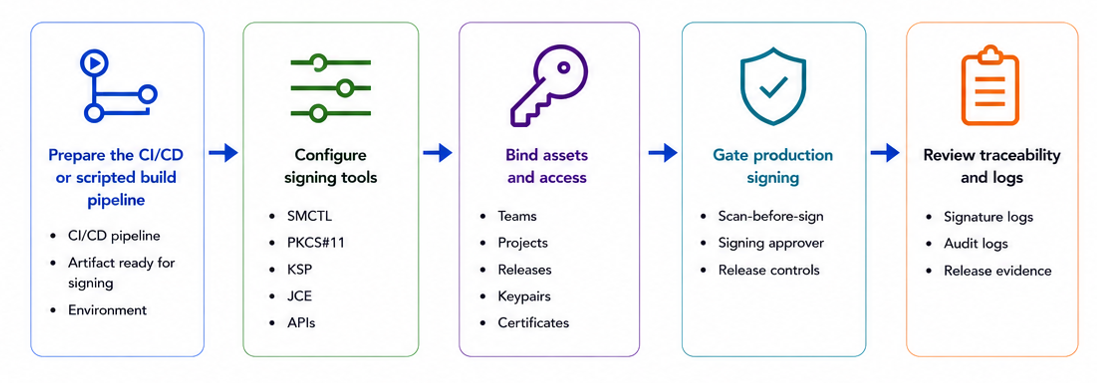
Start with an existing CI/CD or scripted build workflow and identify the point where the artifact is ready to be signed. Keep CI/CD responsible for source checkout, build, test, packaging, promotion, and deployment. Use Software Trust Manager for signing authority, protected key use, and signing evidence. Configure CI/CD marketplace plug-ins and scripts for signing automation.
Identify the artifact type, native signing tool, build runner, release path, and environment.
Configure CI/CD marketplace plug-ins and scripts for signing automation.
Confirm whether the workflow is development, staging, production, or migration/cutover.
Document which team, project, release, keypair, certificate, signer, and approval checkpoint apply.
Confirm that private keys will remain in Software Trust Manager /HSM-backed storage and will not be copied into the runner.
Configure the signing interface that matches the artifact ecosystem. Software Trust Manager can support command-line, native-tool, custom, and CI/CD integration patterns while preserving centralized signing governance.
Install or reference Software Trust Manager client tools such as SMCTL, KSP, PKCS#11, or JCE.
Authenticate the assigned Build engineer signer with the required API key and client authentication certificate.
Demonstrate signer access by listing assigned keypairs, certificates, or signing resources.
Use the native signing tool where it is responsible for packaging the signature correctly for the artifact format.
Bind the workflow to approved signing resources before production use.
Assign the workflow to a development team and development keypair/certificate.
Run development signing and verify the signature.
Promote or clone the workflow for production.
Assign production team, production keypair/certificate, and production Release.
Confirm the signer can use only the approved resources.
Use release controls, signing approver review, or scan-before-sign where the customer policy requires an explicit gate before production signing.
Add a signing approver checkpoint when production policy requires approval.
Run threat detection scans before signing when required by artifact risk or release policy.
Confirm that the release, signer, keypair, certificate, and artifact are in scope.
Block signing when the workflow uses the wrong keypair, unauthorized identity, unapproved Release, or unsupported signing path.
Use logs to verify which signer, keypair, certificate, artifact, signing tool, and release controls were involved in the signing event.
Open Signature Logs to review signer, artifact, timestamp, certificate, keypair, signing tool, and signing status.
Open Audit Logs to review profile changes, team assignment, release activity, certificate actions, approval workflows, and sensitive key actions.
Export logs when evidence must be reviewed in an external reporting, SIEM, or GRC platform.
Use the evidence to support release review, rollback decisions, migration validation, or post-release audit.