- DigiCert product docs
- Trust Lifecycle Manager
- 統合ガイド
- Microsoft Intune
Microsoft Intune SCEP 統合ガイド
Microsoft Intune provides mobile device management and mobile application capabilities that let you determine the data different users in your organization can access. The integrated data protection and compliance capabilities define what users can do with the data within Microsoft Office and other mobile apps.
Integrating Microsoft Intune with DigiCert® Trust Lifecycle Manager allows you to generate digital certificates that provide trust without any usernames, passwords, or additional hardware tokens. In addition, Trust Lifecycle Manager provides quick deployment and easy management and offers industry leading security that is unmatched by in-house PKI solutions.
This guide describes how to integrate Microsoft Intune using the SCEP (Simple Certificate Enrollment Protocol) service of Trust Lifecycle Manager to request and issue the following certificate types from DigiCert:
Device AuthenticationPublic S/MIMEUser (Client) AuthenticationPrivate Server
統合アーキテクチャ
以下の図は、Microsoft Endpoint ManagerがSCEPを介してTrust Lifecycle Managerと統合する方法を説明するものです。
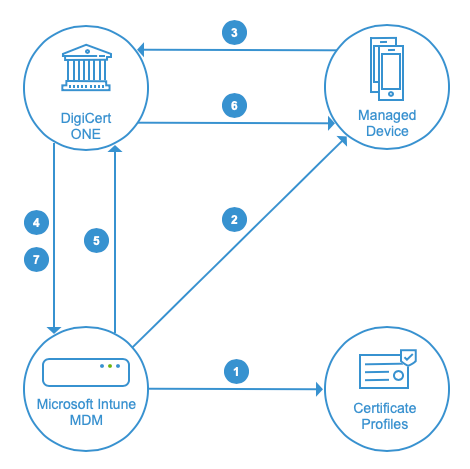
Intune管理者は、Trust Lifecycle Managerで作成された証明書プロファイルに対応する証明書テンプレートをMicrosoft Intuneで作成します。
Microsoft Intuneは、デバイス構成プロファイル(信頼できる証明書およびSCEPタイプ)を、指定されたエンドポイントデバイスのグループにデプロイします。
デバイスの 1 つが Trust Lifecycle Manager から証明書を要求します。
DigiCert は Intune で要求を検証します。
Microsoft Intune は、検証に対する応答を DigiCert SCEP サービスに提供します。
DigiCert ONEは、申請したデバイスに証明書を発行します。
最後に、DigiCert ONEは、Intuneに確認メッセージを送信します。
Intune service instances
The integration has been qualified to work with the following Microsoft Intune service instances. Set up the Azure application for the integration in the same cloud as your Intune tenant. Enter the platform URL for that cloud when configuring the connector in Trust Lifecycle Manager.
Service instance | Platform URL | Description |
|---|---|---|
Commercial | | The standard Intune service, used by tenants in any commercial datacenter region (including Europe) and by Microsoft 365 Government Community Cloud (GCC) tenants. |
US government (GCC High) | | The US government cloud instance of Intune, used by Microsoft 365 GCC High tenants. |
China | The sign-in URL for your tenant, for example | Intune operated by 21Vianet, the separate Microsoft cloud in China. |
Workflow
To set up the Microsoft Intune integration via SCEP, complete these tasks in order:
タスク | ドキュメンテーション | |
|---|---|---|
1. | Intune の設定を行い、必要なベーステンプレートとシートが Trust Lifecycle Manager で利用可能になっていることを確認します。 | |
2. | Trust Lifecycle Manager で Microsoft Intune コネクタを設定します。 | |
3. | Intune で信頼された証明書プロファイルを作成し、証明書の申請用に Trust Lifecycle Manager で対応する証明書プロファイルを作成します。 | |
4. | Intune モバイルデバイス管理(MDM)プラットフォームでデバイスを申請します。 | |
5. | Trust Lifecycle Manager で発行された証明書を検証します。 |